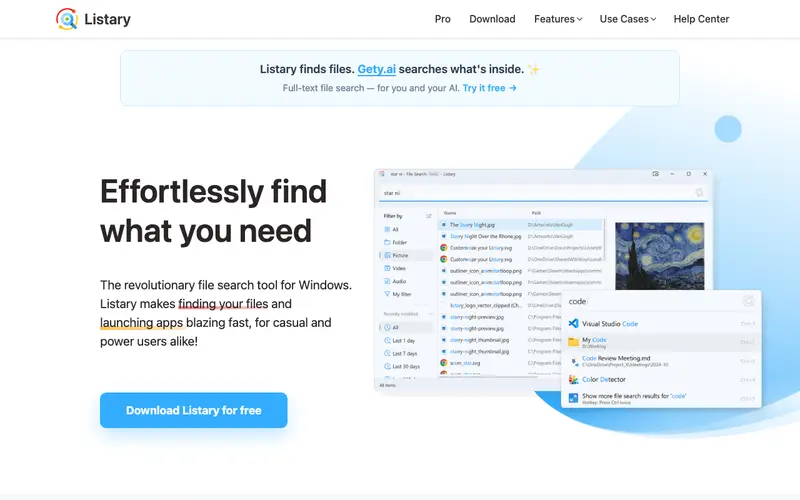
Listary is a versatile search utility and application launcher for Windows, developed by Channing Wong, designed to make finding files and launching applications incredibly fast and intuitive. It integrates deeply with Windows Explorer, file dialogs, and the desktop, allowing you to search for files or folders by simply typing their names. The primary workflow involves invoking Listary (often by double-tapping Ctrl) and typing your search query directly into any Explorer window or file dialog, or from the desktop to launch apps. It is exclusively available on Windows. Its most used feature is "Search-as-you-type" in file dialogs, letting you jump to files instantly when saving or opening. Listary stores its settings and index locally on your computer for quick access.
Editorial check
How this page is checked
Source trail
listary.com
External links are separated from Surfaced commentary.
Reader safety
Context before clicks
Product links and external services are not presented as guarantees.
Monetization
No affiliate flag
Ads and commerce links are kept distinct from editorial text.
Surfaced take
Why It’s Useful
Listary eliminates the frustrating chore of navigating complex folder structures or endlessly clicking through directories to find a specific file, saving hours over time. For the graphic designer, it means quickly finding specific assets, project files, or inspiration images scattered across multiple drives without breaking their creative flow. For the office worker, it provides a lightning-fast way to access frequently used reports, spreadsheets, or client documents, even when they're buried deep in shared network drives. Listary offers a free version with core search and launch capabilities that is genuinely useful, while a Pro version unlocks advanced features like custom commands and fuzzy matching. Compared to Windows Search, Listary is significantly faster and more context-aware, integrating seamlessly into existing file operations rather than being a separate app. A power feature is its "commands" which allow users to perform actions like "copy path" or "open with" directly from the search bar, or create custom commands for specific workflows. The learning curve is very low; basic search functionality is immediately apparent, and a non-technical person can become proficient in under 5 minutes.
In everyday life
When you’d actually reach for this
You need to quickly find that invoice for your Sunday budget review, or locate the shared document for your group trip planning. When you're about to leave for vacation, you can use it to quickly pull up all the files your colleague will need.





Enjoyed this? Get five picks like this every morning.
Free daily newsletter — zero spam, unsubscribe anytime.