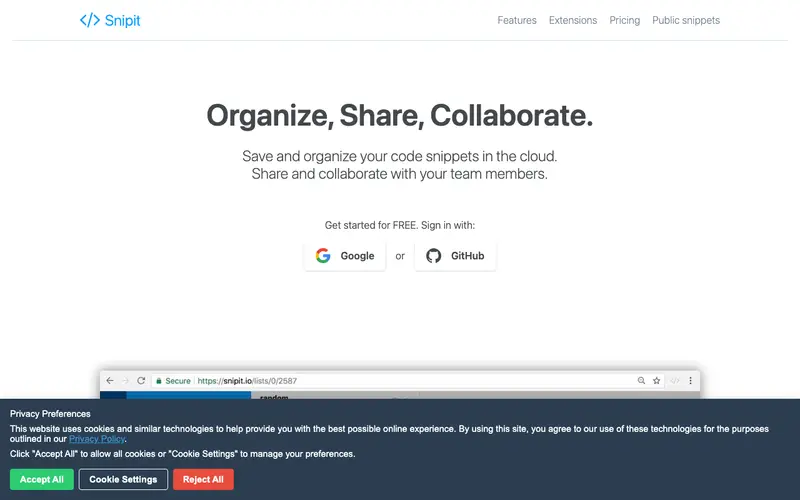
Snipit.io, developed by a dedicated software company, is a cloud-based code snippet manager designed for both individual developers and collaborative teams. It provides a secure platform to store, organize, and retrieve code snippets with features like syntax highlighting, tagging, and powerful search capabilities. Users can create private snippets for personal use or share them publicly or with specific team members. The tool is primarily a web application, accessible via any modern browser, and also offers desktop clients for Windows and macOS. Its most used feature is the ability to quickly save and categorize code snippets, making them easily discoverable across projects. All user data, including code snippets and organizational structures, is stored and synchronized securely in the cloud.
Editorial check
How this page is checked
Source trail
snipit.io
External links are separated from Surfaced commentary.
Reader safety
Context before clicks
Product links and external services are not presented as guarantees.
Monetization
No affiliate flag
Ads and commerce links are kept distinct from editorial text.
Surfaced take
Why It’s Useful
Snipit.io eliminates the chaos of managing code snippets across various local files, disparate notes, or unsearchable chat logs, bringing them into a centralized, accessible system. For the lead developer managing multiple projects, it offers a shared repository for common utility functions, configuration examples, and deployment scripts, fostering consistency across the team. For the solo entrepreneur learning to code, Snipit.io serves as a growing library of solutions for different programming challenges, making it easier to recall and reuse past work. Snipit.io offers a free tier that is genuinely useful for individual users, providing ample storage for personal snippets, with paid plans offering unlimited snippets, team features, and enhanced collaboration tools. It stands out against local-only snippet managers by offering seamless cloud synchronization and robust team collaboration features out of the box. The "snippet versioning" power feature allows users to track changes to their snippets over time, providing a safety net and historical context for complex code fragments. A non-technical person could sign up and start saving basic text snippets in under 5 minutes, though code-specific features require some coding familiarity.
In everyday life
When you’d actually reach for this
You're stuck on a recurring bug in a project and need to quickly find that solution you saved last month. Or maybe you're onboarding a new team member and want to share a set of common code patterns.





Enjoyed this? Get five picks like this every morning.
Free daily newsletter — zero spam, unsubscribe anytime.