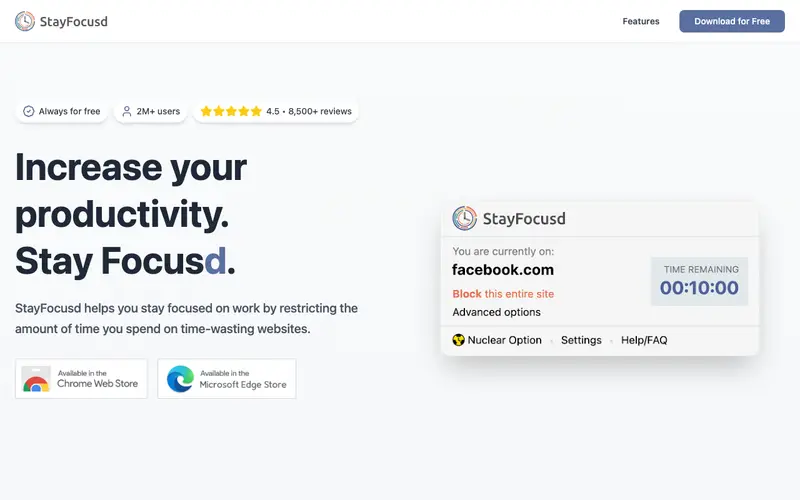
StayFocusd, a popular Chrome browser extension, is designed to enhance productivity by limiting the amount of time users can spend on time-wasting websites. Developed by a dedicated team of productivity enthusiasts, its core function is to block or restrict access to specified distracting sites after a pre-set daily time limit is reached. Users can configure a list of blocked sites and define their allowed daily usage duration for each, or for all combined. It primarily works as a Chrome browser extension. Its most used feature is the "Nuclear Option," which blocks all specified sites for a chosen period. Settings and blocked site lists are stored locally within the browser.
Editorial check
How this page is checked
Source trail
stayfocusd.com
External links are separated from Surfaced commentary.
Reader safety
Context before clicks
Product links and external services are not presented as guarantees.
Monetization
No affiliate flag
Ads and commerce links are kept distinct from editorial text.
Surfaced take
Why It’s Useful
StayFocusd directly addresses the pervasive problem of digital distractions and procrastination by enforcing self-discipline on the user's browser habits. For a remote worker struggling with the temptation of social media during work hours, StayFocusd provides a firm digital barrier, ensuring deep work periods remain uninterrupted. For a student preparing for exams, it can block entertainment sites, making sure study time is dedicated and efficient without constant tab-switching. The free tier is fully functional and genuinely useful, offering all core features without any hidden paywalls. Compared to other general-purpose site blockers, StayFocusd excels with its "The Nuclear Option" and the ability to block specific subdomains, offering granular control. Its power feature allows users to whitelist specific pages or elements within a blocked domain, enabling access to necessary tools without the distractions. A non-technical person can easily install and configure StayFocusd in under 5 minutes, making it highly accessible.
In everyday life
When you’d actually reach for this
You find yourself endlessly scrolling through social media instead of working on your Sunday budget. Before leaving for annual leave, you need to ensure a smooth hand-off, but those news tabs keep pulling you in. You promised yourself you'd finally read those articles, but now they are just a distraction from planning that group trip.






Enjoyed this? Get five picks like this every morning.
Free daily newsletter — zero spam, unsubscribe anytime.