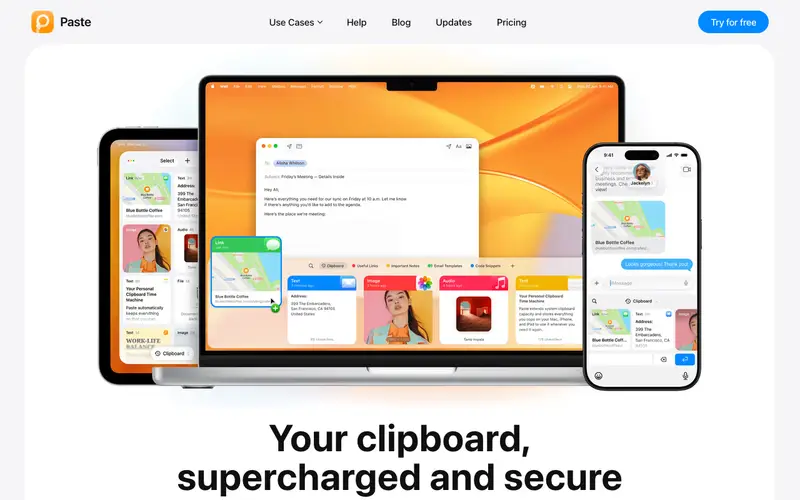
Paste – Clipboard Manager is a visual and intelligent clipboard history manager for macOS and iOS, developed by PasteApp, Inc., designed to save everything you copy and organize it for instant access. It provides a beautiful interface that visually displays your clipboard history, making it easy to find and paste text, links, images, and files. The primary workflow involves copying items as usual, then invoking Paste with a global hotkey to reveal a searchable, scrollable timeline of your clipboard history, from which you can drag or click to paste. It is available for macOS and iOS (with iCloud sync). Its most used feature is its visual timeline of copied content, allowing users to quickly identify and retrieve past items. Paste syncs your clipboard history across your Apple devices using iCloud, providing a seamless experience whether you're on your Mac or iPhone.
Editorial check
How this page is checked
Source trail
pasteapp.io
External links are separated from Surfaced commentary.
Reader safety
Context before clicks
Product links and external services are not presented as guarantees.
Monetization
No affiliate flag
Ads and commerce links are kept distinct from editorial text.
Surfaced take
Why It’s Useful
Paste eliminates the constant back-and-forth of copying and pasting, turning your clipboard into a powerful, organized repository of information. For the UX designer, it's invaluable for collecting UI text, color codes, image assets, and links during research without having to save each item individually. For the writer working on a complex piece, it allows for easy access to research notes, character names, or quoted passages without interrupting the creative flow. Paste offers a 14-day free trial, after which it requires a subscription (monthly or yearly), making it a premium solution for dedicated users. Compared to simpler managers like Maccy or CopyClip, Paste wins with its stunning visual interface, robust search, smart lists, and seamless cross-device iCloud sync. A power feature is the 'Pinboards' functionality, allowing users to create permanent collections of frequently used snippets for quick access, transforming it into a snippet manager. A non-technical person can install and immediately benefit from its visual history in under 2 minutes, though advanced organization features take a moment to learn.







Enjoyed this? Get five picks like this every morning.
Free daily newsletter — zero spam, unsubscribe anytime.