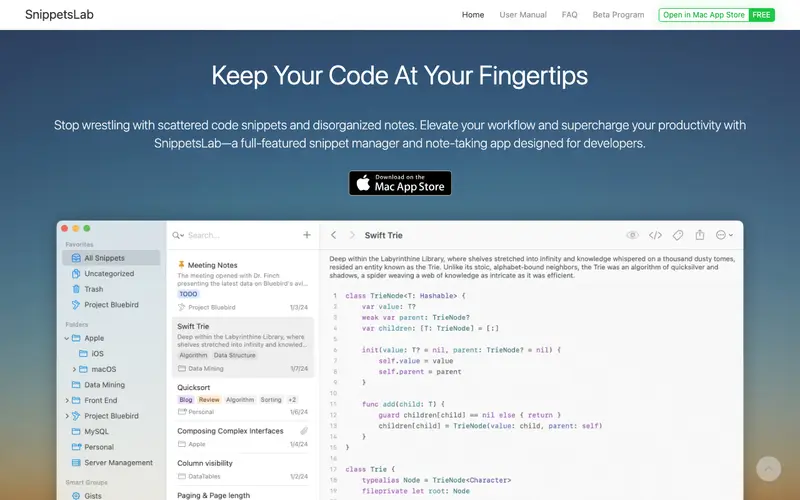
SnippetsLab is a powerful and elegant code snippet manager developed by CodeExpander, designed exclusively for macOS and iOS users. It provides a robust solution for organizing, managing, and quickly accessing code snippets with support for over 350 languages. The primary workflow involves importing existing snippets or creating new ones with rich metadata, including tags, notes, and a dedicated language setting, then effortlessly retrieving them via search or keyboard shortcuts. SnippetsLab is available as a native application for macOS and iOS, offering seamless integration with the Apple ecosystem. Its most used feature is the smart groups and nested folders, which allow for highly organized and granular categorization of snippets. Data is stored locally and can be synchronized via iCloud or Dropbox, ensuring snippets are accessible and backed up across all your devices.
Editorial check
How this page is checked
Source trail
renfei.org
External links are separated from Surfaced commentary.
Reader safety
Context before clicks
Product links and external services are not presented as guarantees.
Monetization
No affiliate flag
Ads and commerce links are kept distinct from editorial text.
Surfaced take
Why It’s Useful
SnippetsLab eliminates the common problem of fragmented and hard-to-find code by centralizing and categorizing all your reusable code fragments. For a freelance macOS developer, it's indispensable for storing frequently used Apple API calls, UI components, and project setup scripts, significantly speeding up development. A university student learning multiple programming languages can keep all their syntax examples, algorithm implementations, and common boilerplate code perfectly organized and readily available. The free trial offers full functionality for a limited period, after which a one-time purchase is required, making it a worthwhile investment for dedicated users. While GitHub Gist is great for sharing, SnippetsLab excels in deep local organization and powerful search capabilities within a dedicated desktop application. A power feature is the integration with various IDEs and text editors, allowing for quick snippet insertion without leaving your coding environment. The learning curve is relatively low; a non-technical person could set it up and save their first few snippets with basic tags within 5-10 minutes.







Enjoyed this? Get five picks like this every morning.
Free daily newsletter — zero spam, unsubscribe anytime.