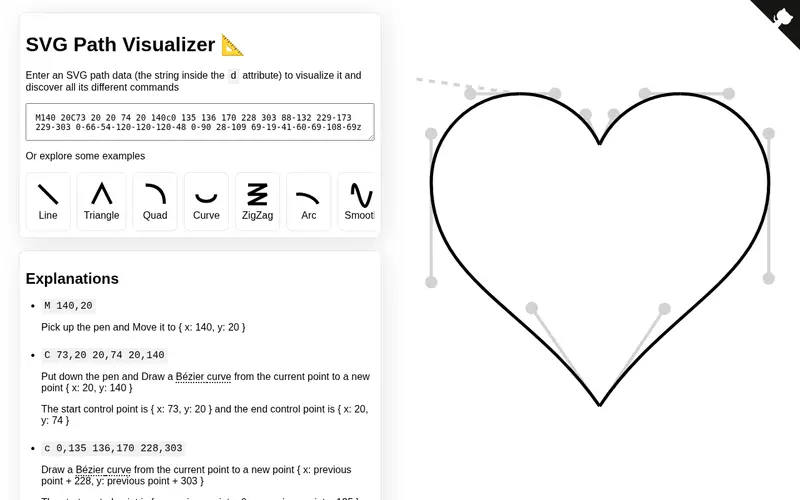
Vector Design Explorer is a web-based tool that allows users to visualize and understand the intricate paths and structures within SVG (Scalable Vector Graphics) files. It provides an interactive environment where designers can dissect complex vector graphics, inspect individual paths, manipulate anchor points, and analyze the underlying code. The tool is free to use and is invaluable for learning how SVGs are constructed, debugging design issues, or understanding the output of vector design software. It excels at demystifying the often-complex world of vector data structures.
Editorial check
How this page is checked
Source trail
svg-path-visualizer.netlify.app
External links are separated from Surfaced commentary.
Reader safety
Context before clicks
Product links and external services are not presented as guarantees.
Monetization
No affiliate flag
Ads and commerce links are kept distinct from editorial text.
Surfaced take
Why It’s Useful
For anyone working with vector graphics, especially for web development or intricate illustration, understanding the precise nature of SVG paths is paramount. Vector Design Explorer acts as an X-ray for SVGs, revealing the hidden logic behind shapes and curves. It's particularly useful for web designers aiming for pixel-perfect implementations, animators working with SVG code, and students learning the fundamentals of vector art. The ability to see how designers have constructed complex forms from simple paths offers immense educational value and practical problem-solving capabilities, making it a go-to resource for refining SVG assets.
In everyday life
When you’d actually reach for this
If you've downloaded an SVG icon online and it's not quite behaving as expected in your web design, you can load it into Vector Design Explorer. You'll immediately see the specific path data causing the issue, allowing you to quickly adjust it for a perfect fit.






Enjoyed this? Get five picks like this every morning.
Free daily newsletter — zero spam, unsubscribe anytime.