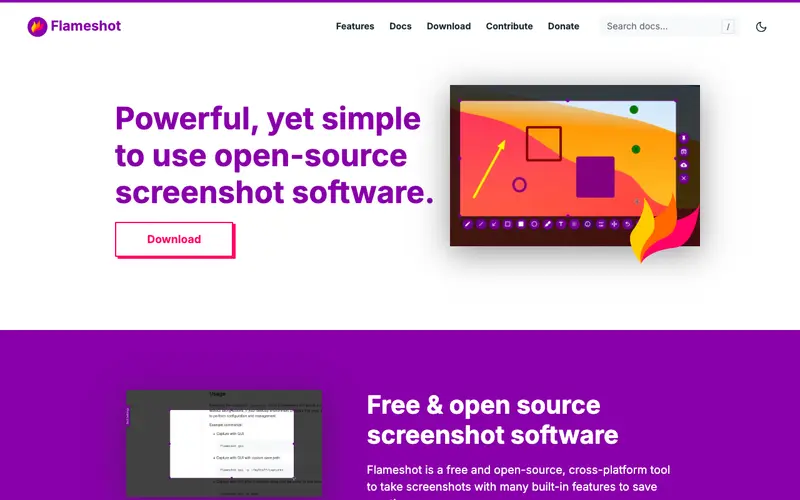
Flameshot, an open-source project by a community of developers, is a powerful and customizable screenshot tool designed for Linux and Windows, offering extensive annotation capabilities. Its primary workflow involves activating the tool with a hotkey, selecting a region of the screen, and then using a rich set of built-in annotation tools like arrows, text, shapes, and pixelation before saving or uploading. Flameshot is available as a desktop application for Linux and Windows, making it a versatile choice for cross-platform users. The most used feature is its highly customizable annotation sidebar, which provides quick access to a wide array of editing tools directly on the captured image. All captured images are saved locally to your system, providing complete privacy and control over your data.
Editorial check
How this page is checked
Source trail
flameshot.org
External links are separated from Surfaced commentary.
Reader safety
Context before clicks
Product links and external services are not presented as guarantees.
Monetization
No affiliate flag
Ads and commerce links are kept distinct from editorial text.
Surfaced take
Why It’s Useful
Flameshot eliminates the limitations of basic, built-in screenshot utilities by providing a feature-rich and highly configurable solution for precise captures and annotations. For the open-source developer working on bug reports, it's invaluable for quickly capturing specific UI elements, highlighting issues with arrows and text, and then directly uploading to GitHub or sharing with collaborators. For the technical writer documenting software for diverse audiences, Flameshot allows for creating clear, professionally annotated screenshots for manuals and guides across both Linux and Windows environments. Flameshot is completely free and open-source, offering full functionality without any hidden costs or premium features, making it an excellent community-driven choice. Compared to default OS screenshot tools, Flameshot wins with its rich set of annotation tools, pixelation, and direct upload capabilities to various services. A power feature is its ability to directly upload screenshots to Imgur from the annotation interface, providing an instant shareable link for quick communication. A non-technical person can install Flameshot and take their first annotated screenshot in under 5 minutes, though exploring all customization options might take a bit longer.






Enjoyed this? Get five picks like this every morning.
Free daily newsletter — zero spam, unsubscribe anytime.