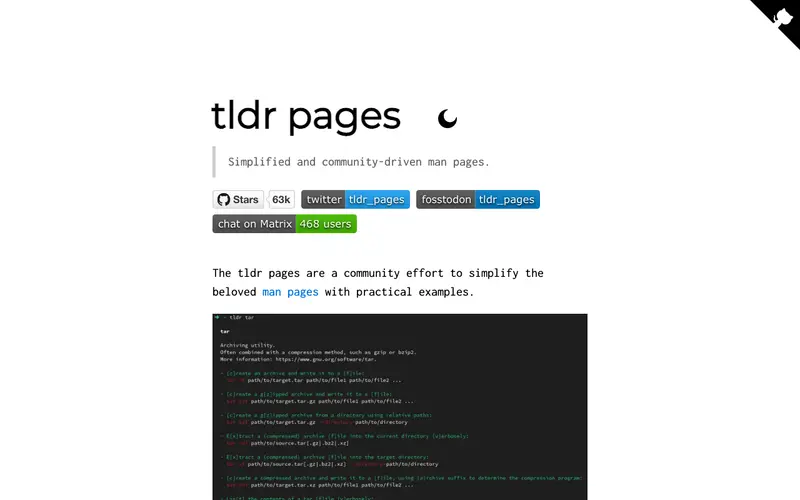
tldr pages is a community-driven collection of simplified man pages, offering practical examples for common Unix commands, maintained by a global open-source community. It aims to provide quick, human-readable summaries of command-line tools, focusing on their most frequent use cases rather than exhaustive documentation. The primary workflow involves typing `tldr <command>` in the terminal to instantly get concise examples of how to use that command, bypassing lengthy traditional man pages. tldr pages are primarily accessed via various client applications on the command line for Linux, macOS, and Windows, but also have web-based versions. Its most used feature is the immediate display of practical examples for commands like `git`, `tar`, or `curl`, which saves developers time. Data is sourced from a public GitHub repository, ensuring it's always up-to-date and collaboratively maintained.
Editorial check
How this page is checked
Source trail
tldr.sh
External links are separated from Surfaced commentary.
Reader safety
Context before clicks
Product links and external services are not presented as guarantees.
Monetization
No affiliate flag
Ads and commerce links are kept distinct from editorial text.
Surfaced take
Why It’s Useful
tldr pages eliminate the frustration of sifting through verbose and often overwhelming traditional man pages to find a simple command usage example. For a junior developer learning the command line, tldr provides clear, actionable examples for `ls` or `grep` without needing to understand every obscure flag. A seasoned DevOps engineer can quickly refresh their memory on a complex `kubectl` command or `ffmpeg` syntax, speeding up their task execution. The free tier is entirely useful, as tldr pages are a completely open-source and free project, accessible to anyone with an internet connection and a terminal. Unlike the comprehensive but dense `man` command, tldr focuses on practical, real-world usage, making it far more efficient for everyday tasks. A power feature is the ability to contribute new examples or improvements to existing ones, empowering the community to keep the documentation relevant and up-to-date. The learning curve is practically non-existent; if you can type a command, you can use tldr pages.






Enjoyed this? Get five picks like this every morning.
Free daily newsletter — zero spam, unsubscribe anytime.